Every Last Grain

Free Browser Game · Unity WebGL
PARKING LOT Sand Deposit Terminal Ready
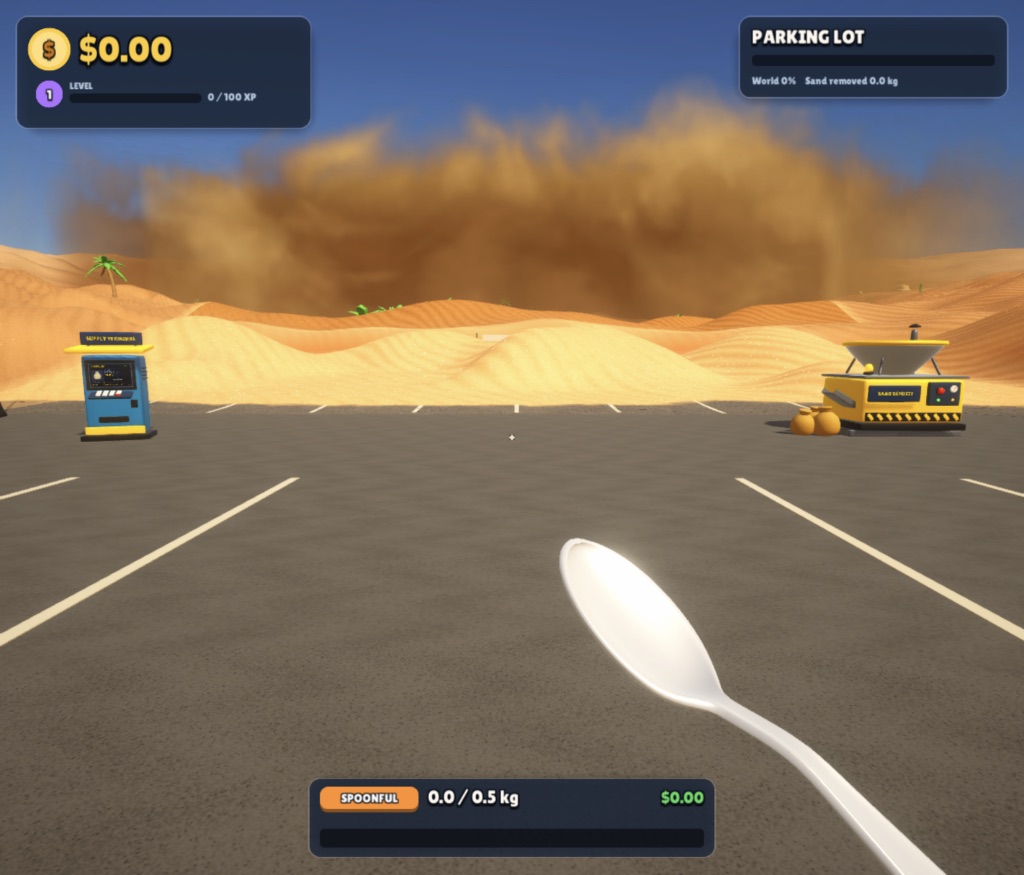
Every Last Grain 3D desert parking lot with Supply Terminal, Sand Deposit hopper, and starter soup spoon
SPOONFUL 0.0 / 0.5 kg · Click to launch in browser

Loading Every Last Grain…

Initializing Unity WebGL desert terrain and Sand Deposit terminal.

What Is Every Last Grain?

Every Last Grain is a first-person indie incremental simulator created by Oliver Kuso where you are hired to remove an entire desert from a windswept parking lot at the end of the world. The new landowner wants every dune gone down to the final speck of sand and pays you cash by the kilogram.

You begin Every Last Grain standing on sun-baked asphalt between two yellow-and-blue camp machines—a Supply Terminal on the left and a Sand Deposit hopper on the right—holding nothing more than a single white soup spoon rated for 0.5 kg per scoop. Carrying tiny spoonfuls back to the hopper feels comically slow at first, and that friction is the core hook of Every Last Grain.

Every kilogram you dump into the Sand Deposit hopper melts down for cash and experience points. Spending that money at the Supply Terminal steadily transforms your modest spoon run into an escalating desert-clearing operation powered by trowels, shovels, wheelbarrows, industrial vacuums, and heavy machinery. As the sand level physically drops around the parking lot, buried objects and hidden relics emerge from beneath the dunes, rewarding careful exploration alongside raw clearing speed.
How to Play Every Last Grain

Every Last Grain runs on a tight four-step loop that takes seconds to learn and roughly thirty minutes to push through its full tool progression.

  1. 01

    Walk to the Dunes

    Step off the asphalt parking lot toward the sunlit sandbanks directly ahead using WASD and mouse look.

  2. 02

    Scoop Until Full

    Left-click on the sand to fill your current tool. Watch the bottom SPOONFUL gauge climb toward its kilogram cap.

  3. 03

    Deposit at Camp

    Carry your load back to the yellow-and-black Sand Deposit hopper on the right side of the parking lot to collect cash and XP.

  4. 04

    Buy Upgrades

    Visit the blue Supply Terminal on the left side of the lot to unlock larger tools, faster clearing speed, and higher capacity.

Every Last Grain Controls

Input Action Notes
W A S D Move Walk across the parking lot and climb across the sand dunes.
Mouse Look Around Click inside the game canvas to lock the camera crosshair.
Left Click Scoop / Operate Tool Dig sand with your spoon, shovel, vacuum, or heavy equipment.
Space Advance Cutscene / Jump Step through the opening intro lines or navigate uneven terrain.
P Upgrades & Stats Menu Quickly inspect upgrade trees and sand-clearing stats in supported builds.

Every Last Grain Upgrades & Progression

The joy of Every Last Grain comes from feeling the scale of your tools leap forward while the physical desert terrain shrinks in front of you.

  1. Phase 01

    The Soup Spoon Wall (0.5 kg)

    Your opening minutes in Every Last Grain are intentionally humble. Each scoop holds only half a kilogram, forcing short trips between the nearest dune edge and the Sand Deposit hopper until you earn your first upgrade dollars.

  2. Phase 02

    Trowels & Shovels

    Once you move past the soup spoon at the Supply Terminal, larger hand tools multiply your per-trip kilogram capacity and speed up how quickly you carve trenches along the parking lot edge.

  3. Phase 03

    Wheelbarrows & High-Powered Vacuums

    Mid-game equipment shifts Every Last Grain from manual scooping to rapid bulk hauling. High-capacity carriers and suction tools strip entire ridges down to bare ground in seconds.

  4. Phase 04

    Heavy Machinery & Buried Relics

    Late-game desert-eaters tear through massive dunes at industrial scale. Lowering the sand exposes hidden collectibles and buried relics along the lot perimeter, giving completionists extra secrets to hunt down.

Tips & Common Questions for Every Last Grain

Keep these practical details in mind before you start hauling sand so you spend less time walking and more time upgrading.

Work the Nearest Dune Edge First

During the 0.5 kg spoon phase of Every Last Grain, walking distance costs more time than clicking. Dig right along the white parking lines closest to the Sand Deposit hopper so every deposit trip takes only a couple of seconds.

Prioritize Capacity Before Speed

Early upgrades that increase how many kilograms you can carry per trip cut your round-trip travel time immediately, letting you earn your next Supply Terminal unlock much faster than tiny scoop-speed bumps.

Desktop Browser Recommended

Because Every Last Grain is a first-person Unity WebGL game built around mouse look and WASD movement, it plays best on a desktop or laptop in Chrome, Edge, or Firefox with hardware acceleration enabled.

Sound & Pointer Lock Notes

Click directly inside the game frame after loading to enable audio and mouse look. If the game feels sluggish or fails to capture the cursor, try switching to Fullscreen mode using the button right below the stage.

Every Last Grain FAQ

Can I play Every Last Grain for free without downloading anything?

Yes. Every Last Grain runs directly in your web browser via Unity WebGL. Click Play Every Last Grain at the top of this page to load the game with no installation or account required.

Who developed Every Last Grain?

Every Last Grain was created by indie developer Oliver Kuso and first gained a following on itch.io for its humorous soup-spoon premise and tactile desert-clearing loop.

How long does it take to beat Every Last Grain?

Most players spend around 30 minutes progressing from the starter soup spoon through shovels, vacuums, and heavy machinery in the current browser build, plus extra time if you hunt for buried relics.

Can I play Every Last Grain on mobile phones or tablets?

While the page loads on mobile browsers, Every Last Grain uses first-person WASD movement and mouse look designed for keyboard and mouse. A desktop or laptop browser gives the intended experience.

Does Every Last Grain support fullscreen mode?

Yes. Click the Fullscreen button directly below the game frame for an unobstructed view of the dunes and smoother mouse control.

What should I do if Every Last Grain does not load or feels laggy?

Make sure WebGL and hardware acceleration are turned on in your browser settings, close heavy background tabs, and refresh the page. Clicking once inside the canvas after loading also wakes up audio and controls.

Player Comments

0 comments
Replying to